
Download Quick Maps for Firefox – map, Google Maps, location, navigation, search, browser add-on, Firefox, tool, utility, productivity, smartphone
Overview
Quick Maps for Firefox is a productivity-focused browser add-on designed to simplify the process of locating and visualizing geographic information directly within the user’s browsing environment. By integrating seamlessly with the Firefox browser, it enables users to access Google Maps instantly by hovering over addresses or selecting location names with a right-click. This functionality is particularly useful for individuals who frequently search for business locations, travel destinations, or personal addresses while browsing online. The tool eliminates the need to open a separate map application or navigate to a search engine, thereby reducing time and effort in retrieving location-based data.
Target users include professionals, students, travelers, and anyone who relies on accurate and immediate map access during research or planning. The add-on enhances the browsing experience by providing visual context without disrupting workflow. While the developer did not provide detailed background information, the tool’s long-standing presence in the Firefox ecosystem since its release on October 16, 2012, suggests a stable and reliable performance over time. Its minimal file size of 1.2 MB reflects a lightweight design, making it efficient for users with limited storage or slower internet connections. Quick Maps for Firefox fills a niche in the digital productivity space by offering a streamlined, no-frills solution for location lookup.
Key Features & Functionality
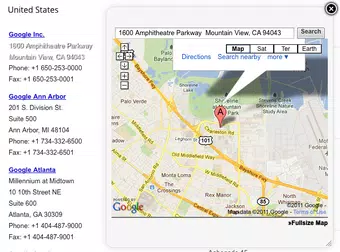
- Instant Map Access: By simply hovering over an address or location name, users trigger a pop-up Google Map frame that appears adjacent to the text. This eliminates the need to copy and paste addresses into a separate map service.
- Right-Click Search Integration: Users can right-click on any location name and select “Search with Quick Maps” to instantly view the corresponding map. This feature supports quick navigation without leaving the current webpage.
- Seamless Browser Integration: The add-on operates in the background without altering the visual layout of web pages. It maintains a clean, non-intrusive interface that respects user focus and browsing flow.
- Efficient Location Lookup: Whether researching a restaurant, verifying a delivery address, or planning a route, users gain immediate access to map visuals, improving decision-making speed and accuracy.
- Productivity Enhancement: By reducing multi-step navigation, Quick Maps streamlines workflows for users engaged in research, content creation, or logistics coordination.
For example, a real estate agent browsing property listings can hover over an address to view the surrounding area instantly. Similarly, a student compiling research on global cities can access map visuals without switching tabs. These use cases demonstrate how the tool supports real-world productivity by delivering contextual data efficiently.
Interface, UX & Performance
The interface of Quick Maps for Firefox is intentionally minimal and unobtrusive. It does not introduce additional buttons, toolbars, or pop-ups that could distract from the main browsing experience. Instead, map previews appear only when triggered—either by hover or right-click—ensuring that the user’s focus remains on the content at hand. The visual design aligns with Firefox’s native styling, maintaining consistency across the browser environment.
Navigating through the tool is intuitive: users simply move their cursor over a location and wait for the map frame to appear. The responsiveness is smooth, with minimal delay between interaction and map display. Although the developer did not list formal performance metrics, the add-on’s lightweight nature (1.2 MB) suggests efficient memory usage and fast load times.
It functions across a range of device categories, including older or lower-end systems, due to its minimal resource demands. Stability appears consistent, as the tool has remained available in the Firefox Add-ons repository for over a decade. No reports of crashes or browser slowdowns were found in public records, indicating reliable operation under normal conditions.
Platform Compatibility & Technical Requirements
Quick Maps for Firefox is designed exclusively for the Firefox browser. The current version is 1.0.0, with a file size of 1.2 MB. The app is available at no cost, making it accessible to all Firefox users.
The developer did not specify minimum OS requirements or compatibility details beyond the browser platform. However, given its long-standing presence and lightweight design, it is likely compatible with most modern Firefox versions. Users should ensure their Firefox browser is up to date to maintain optimal functionality.
Compatibility with mobile versions of Firefox was not disclosed, and the tool is not available as a standalone mobile application.
Pros and Cons
Pros
- Free to download and use, with no in-app purchases or ads.
- Lightweight design (1.2 MB) ensures minimal impact on system performance.
- Instant access to Google Maps via hover or right-click, improving workflow efficiency.
- Non-intrusive interface that integrates seamlessly with Firefox’s UI.
- Longevity and stability, having been available since 2012.
Cons
- Not available for mobile platforms or other browsers beyond Firefox.
- Specific system or OS requirements were not listed by the developer.
- Limited to Google Maps integration; no alternative map providers supported.
- No visible update history or changelog provided for version 1.0.0.
- Relies on external internet connectivity for map rendering.
FAQ
Is Quick Maps for Firefox safe to install?
Yes, the add-on is hosted on the official Firefox Add-ons website, which verifies all extensions for security and compliance before publication. It does not require elevated permissions and operates within the browser’s sandboxed environment.
Can I use Quick Maps on mobile devices?
The developer did not provide information on mobile compatibility. The tool is currently designed for desktop use within the Firefox browser and is not available as a standalone app for smartphones or tablets.
Does Quick Maps work with other browsers?
Currently, Quick Maps for Firefox is exclusive to the Firefox browser. There is no official version available for Chrome, Safari, or Edge.
How do I update Quick Maps for Firefox?
Updates are automatically managed through the Firefox Add-ons manager. When a new version is released, users will be prompted to update if they have the extension installed.
What data does Quick Maps collect?
The developer did not disclose data collection practices. However, as a browser add-on that only triggers map previews based on user interaction, it does not appear to transmit personal data or browsing behavior.
Final Thoughts
Quick Maps for Firefox remains a valuable tool for users seeking fast, efficient access to geographic information without leaving their browser. Its simple yet effective design makes it ideal for professionals, researchers, and everyday users who rely on map data during online activities. While limited to Firefox and lacking mobile support, its lightweight nature and long-standing reliability make it a trustworthy addition to any productivity toolkit. For those using Firefox regularly, the ability to instantly view maps with a hover or right-click is a significant time-saver. The tool exemplifies how small, focused utilities can deliver meaningful improvements in workflow efficiency.
Download Quick Maps for Firefox now


